LightBlog

lundi 28 octobre 2019

Google says Chrome OS 80 will bring easier Android app sideloading for developers

Last week at the Android Dev Summit, Google announced a feature that Chrome OS enthusiasts have wanted for years: the ability to sideload Android apps without enabling Developer Mode. We’ve seen code commits in the past that would have enabled this feature, but none of those implementations ever made their way to the stable channel. Now that Google has officially confirmed this feature will arrive in Chrome OS 80, which is set for a stable release in the second week of February 2020, we no longer need to religiously monitor the Chromium Gerrit for this feature addition.

As you can see in the featured image above, retrieved via AboutChromebooks, Google is adding this feature to let Android app developers deploy their apps straight from Android Studio. With a 22% growth in year-on-year Chromebook sales (from September of 2018 to August of 2019) and the total amount of time spent on Android apps on Chrome OS grown by a factor of 4, Android app developers are incentivized to bring their work to Chromebooks. Developing for Chromebooks requires considerations like how your app reacts to changes in display modes (laptop and tablet), window management (multi-window and free-form windows), and keyboard/mouse input, so it’s recommended to test your app on native hardware. To that end, Google pushed to make Chrome OS more developer-friendly by adding a Linux container last year, enabling the ability to run the Linux version of Android Studio.

While you can develop and build Android apps on a Chromebook, deploying the app is a bit of a headache. Currently, the recommended way to sideload an Android app on Chrome OS is to enable Developer Mode. With Developer Mode enabled, sideloading an Android app is as simple as clicking on your compiled APK file. However, Developer Mode is inherently insecure as it relaxes verified boot protections and grants access to a root shell. It’s also a pain to deal with since it requires powerwashing (factory resetting) your device and dealing with an annoying warning screen that you have to manually bypass on every boot. Thankfully, when Chrome OS 80 rolls out in the stable channel in February 2020, all developers will be able to deploy their Android apps straight from Android Studio onto their Chromebook, without having to enable Developer Mode. If you’re on the Chrome OS Dev channel, you’ll be able to test this out as early as late next month.

Unfortunately, it doesn’t look like Google intends for this feature to be used by end-users. According to the commit that likely implements this feature, this feature requires Crostini (Linux app support) to be enabled, limiting which Chromebooks will have access to the feature. Furthermore, disabling the feature requires a powerwash. If you’re comfortable with the command line, though, sideloading Android apps should be as simple as using “adb install.” Alternatively, you could just “adb push” the APK, enter “adb shell,” and then use “pm install,” right now.

The post Google says Chrome OS 80 will bring easier Android app sideloading for developers appeared first on xda-developers.


from xda-developers https://ift.tt/2MVQI7K
via IFTTT

YouTube Music 3.39 for Android finally adds a widget

Google’s music situation has been frustrating for a lot of people. The company essentially has two separate platforms: Google Play Music and YouTube Music. The former has been around for a while and has a lot of loyal users. The latter is new and still lagging behind in features. One feature that has finally been added to YouTube Music is a home screen widget.

YouTube Music version 3.39 includes a handy widget that can be placed on the home screen of your favorite launcher. This is a pretty standard 4×1 widget that displays the album art and song details along with buttons for thumbs down, previous, play/pause, next, and thumbs up. The widget changes color to match the album artwork and it can’t be resized (though some 3rd-party apps can force it).

A feature like a widget may seem like a small thing to some people, but it’s one of the reasons why some haven’t been eager to switch to YouTube Music. Google Play Music, while not perfect by any means, is a much more feature-full experience. YouTube Music is still being fleshed out and small things like widget support go a long way towards improving the overall experience. Download the latest version of YouTube Music below.

YouTube Music - Stream Songs & Music Videos (Free, Google Play) →

The post YouTube Music 3.39 for Android finally adds a widget appeared first on xda-developers.


from xda-developers https://ift.tt/2NkN06L
via IFTTT

[Update 2: For Real This Time] Samsung confirms an Android 10 beta is coming soon to the Galaxy Note 10

Update 2 (10/28/19 @ 11:55 AM ET): After being released and pulled last week, One UI 2 beta (Android 10) is rolling out to the Galaxy Note 10 again.

Update 1 (10/23/19 @ 7:15 AM ET): Samsung has shared details of the Android 10 beta for the USA. The beta update will only be available for the unlocked variant. Scroll to the bottom for more information. The article as published on October 22, 2019, is preserved as below.

Earlier this month, Samsung announced the Android 10-based One UI 2.0 beta for the Galaxy S10 series. The beta program introduced all Android 10 exclusive features to the Galaxy S10, Galaxy S10+, and the Galaxy S10e. Additionally, the update also introduced some subtle UI changes to further streamline Samsung’s software. For instance, the caller notification and volume bar have been decreased in size so that they aren’t as intrusive. Now, Samsung has announced that the One UI 2.0 beta is coming to its Note 10 series soon.

Note 10 Android 10 One UI beta teaser

As per a recent post on the Samsung community, the beta program will soon make its way to the Galaxy Note 10, Galaxy Note 10+, Galaxy Note 10 5G and the Galaxy Note 10+ 5G. However, the company hasn’t revealed the exact timeline for the same. The program will be available for all Galaxy Note 10 users, including both carrier locked and unlocked devices. Users will be able to participate in the beta from within the Samsung Members app when it goes live. While we aren’t exactly aware of what Samsung plans to introduce in One UI 2.0 specifically for its Note 10 lineup, we do have information on a couple of features that have made their way to the Galaxy S10 series.

Other than the aforementioned UI changes, One UI 2.0 beta for the Galaxy S10 series extends the Dark mode to the home screen, ensuring users don’t have any eye fatigue while using their devices at night. This new Dark mode can adjust the brightness of images, texts, and colors on the display. The company claims that the new Dark mode will further reduce battery consumption, which is great.

One UI Beta Dark Mode

The update also brings minor changes to the Smart Lock screen, which now automatically adjusts the color of the text on the lock screen. On top of that, there are some new tools for digital wellness, including the Focus mode. The Device care menu also has some new features to help you manage your digital wellbeing, along with tools to give you more control over what’s on your device.

Source: Samsung


Update: Android 10 Beta not coming for US carrier variants

Samsung has posted details of the One UI 2.0 Beta with Android 10 for Galaxy Note 10 series in the USA.

According to the teaser, the beta will only be available for the unlocked variants of the Galaxy Note 10 and Galaxy Note 10+. No mention has been made for the carrier variants, and so it can be presumed that a beta will not be available to try on the beta variants. Instead, we can expect to directly update to a more stable release once that begins rolling out.

Source: Samsung


Update 2: For Real This Time

The One UI 2 beta for the Galaxy Note 10 was released last week, but it was actually sent out by mistake. Now, the rollout has begun for real this time. The update brings Android 10 along with November security patches and the fixes for the fingerprint scanner. It’s rolling out in Germany now and should arrive in more countries soon. If you’d like to join the beta program, you can do so with the Samsung Members app below.

Samsung Members (To be announced, Google Play) →

Source: SamMobile

The post [Update 2: For Real This Time] Samsung confirms an Android 10 beta is coming soon to the Galaxy Note 10 appeared first on xda-developers.


from xda-developers https://ift.tt/2obTY5G
via IFTTT

Qualcomm’s upcoming Snapdragon Wear 3300 may be the Wear OS smartwatch chip we’ve been waiting for

Google’s Android OS for smartwatches, Wear OS, isn’t nearly as successful as Android for smartphones, tablets, or televisions, and there’s a lot of blame to go around for that. We can blame Google for not having enough confidence to launch its own smartwatch hardware or for barely giving Wear OS the time of day at its big developer conference, or we can blame Qualcomm for failing to design a competitive smartwatch SoC. Smartwatches from Samsung, Huawei, and Apple, with their custom operating systems and SoCs, tend to have much better battery life than smartwatches with Wear OS and Qualcomm’s Snapdragon Wear 2100 or 3100. Qualcomm’s current wearable platforms are manufactured on a 28nm fabrication process; in comparison, Samsung’s Exynos 9110, found in the Galaxy Watch series, is manufactured on a 10nm fabrication process. Qualcomm may be bridging the gap with its next SoC for wearables, however, and it could come in the form of the Snapdragon Wear 3300.

We first heard about Qualcomm’s next wearable chipset back in July when WinFuture reported on the existence of two chipsets in a prototyping stage. It was believed that one of the chipsets could be marketed as the Snapdragon Wear 2700 and the other the Snapdragon 429 Wear, but the chipsets were still very early in development and there was no indication of when they would launch. Thanks to a tip from XDA Recognized Developer arter97, we know that Qualcomm is indeed preparing a chipset based on the mid-2018 Snapdragon 429 mobile platform, and it’ll likely be called the Snapdragon Wear 3300.

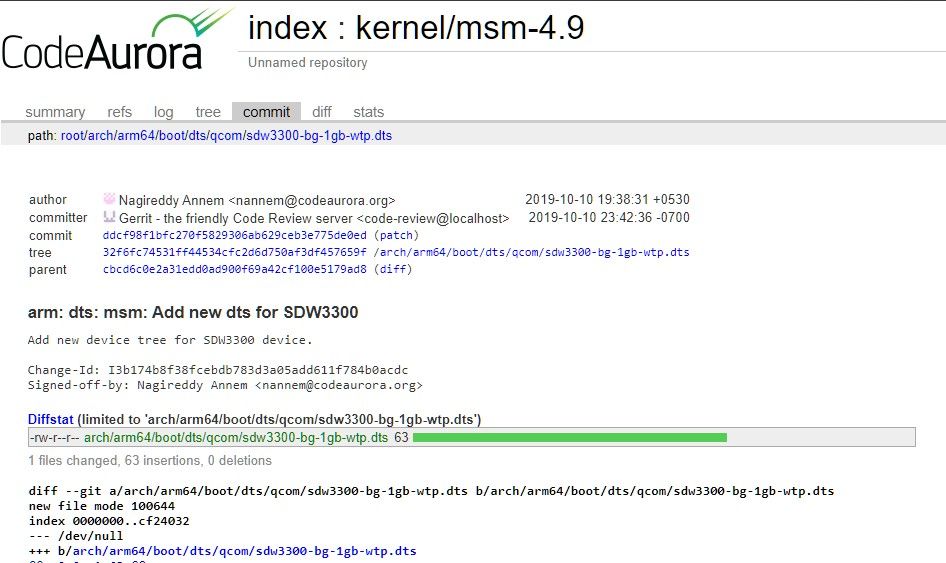
Over on the Code Aurora Forum, where Qualcomm uploads the Linux kernel source code for its various chipsets, a commit was uploaded that adds a device tree for a “SDW3300 device.” The device tree source (DTS) file that was uploaded is titled “sdw3300-bg-1gb-wtp.dts,” and the code indicates the new platform is based on the Snapdragon 429, code-named “Spyro.”

The Qualcomm Snapdragon 429 was introduced in mid-2018 as a 12nm chip with 4 ARM Cortex-A53 CPU cores clocked at up to 1.95GHz. Qualcomm will likely pair these 4 CPU cores with a low-power co-processor, a PMIC, an integrated DSP, and other components to form the new Snapdragon Wear platform. The biggest problem with the Snapdragon Wear 3100 was that its main application processor was still the 4 ARM Cortex-A7 CPU cores fabricated on a 28nm process, so the new wearable SoC should be much more power-efficient and thus provide better battery life. Paired with 1GB of RAM, future Wear OS smartwatches will also perform better than ever.

Of course, this is still just a rumor at this point. Qualcomm has yet to officially confirm any details about its next wearable SoC. We reached out to Qualcomm for comment and will update this article if we hear back.

The post Qualcomm’s upcoming Snapdragon Wear 3300 may be the Wear OS smartwatch chip we’ve been waiting for appeared first on xda-developers.


from xda-developers https://ift.tt/2MS1Cvg
via IFTTT

ARM now says it’ll continue supplying chip technology to Huawei

The trade war between the United States and China has brought a lot of chaos in the technology industry. Even some of the non-US companies decided to stop doing business with Huawei, ARM being one of the first. The United Kingdom-based chip manufacturer halted manufacturing the technology for the Chinese company right after Trump’s order to prohibit US companies from working with Huawei. The original ban was issued on the 16th of May, with ARM following on May 22nd. Though, now it turns out that ARM is ready to continue developing for Huawei.

As you probably already know, Huawei uses HiSilicon Kirin chips for its devices. While the Chinese OEM is responsible for the specifics and design of the system-on-chip, ARM is the architecture they’re using. It goes without saying that ARM’s hesitation to supply chip technology to Huawei would drastically affect the manufacturing plans of the devices. All of the latest Huawei SoCs, including the Kirin 990 5G chip is based on the ARM architecture. Due to the fact that outside of the United Kingdom ARM also operates from a couple of offices in the US, it was necessary to research whether its chip designs included “US-origin technology.”

After months of hesitation and confusion, it looks like ARM’s legal time has finally decided that the company’s relationship with Huawei will not breach the US’ trade ban on Huawei devices. In a talk with Reuters, an ARM spokeswoman confirmed that “ARM’s v8 and v9 are UK-origin technologies,” later also saying the company will continue developing for Huawei. This makes the manufacturing and production process for Huawei a lot easier, as they are striving to become the #1 smartphone manufacturer in the world. You can read our previous write-up about ARM’s distancing decision to get an idea about the situation.


Source: Reuters

The post ARM now says it’ll continue supplying chip technology to Huawei appeared first on xda-developers.


from xda-developers https://ift.tt/31UcVrk
via IFTTT

The ITIL Premier Club Is the Ultimate Learning Resource for Aspiring IT Professionals

The Information Technology Infrastructure Library, or ITIL, is a widely-respected framework for IT service management. If you want to get a job in this industry, it pays to become a certified practitioner. The ITIL Premier Club Essential Pack can help you fly through the exams, with unlimited access to 24 courses, plus Q&A sessions, quizzes, and even discounts on your exams. You can get a Lifetime Membership now for only $69.99 at the XDA Developers Depot.

Certifications are everything in the world of IT — recruiters are looking for people who know their stuff and putting ITIL certificates on your résumé is an easy way to make your application stand out.

You can prep for the ITIL exams by reading dense textbooks, but the ITIL Premier Club offers a better learning experience. This platform offers 20 ITIL V3 and 4 ITIL courses, delivered by expert instructors. As a member, you also get the opportunity to ask your instructors questions and join in with Q&A forums.

The Essential Pack also includes 12 months of access to AXELOS My ITIL. This service provides exam resources, quizzes, and tool kits to ease your progress, and Digital Badges to promote your new certifications.

Order now for $69.99 to get lifetime access to the ITIL Premier Club, worth $2,640.

 
ITIL® Premier Club Essential Pack: Lifetime Membership – $69.99

See Deal

The post The ITIL Premier Club Is the Ultimate Learning Resource for Aspiring IT Professionals appeared first on xda-developers.


from xda-developers https://ift.tt/2qTdAwt
via IFTTT

NVIDIA announces the SHIELD TV Pro and SHIELD TV streaming stick

To the surprise of no one who has paid attention, NVIDIA has revealed two new products in their line of Android TV devices. Both of these devices already showed up on Amazon and Best Buy, but now we can put the “Official” stamp on them. The NVIDIA SHIELD TV Pro is an update to the popular SHIELD TV media streaming boxes, and it’s joined by a more portable SHIELD TV streaming stick.

NVIDIA SHIELD TV and SHIELD TV Pro

Left: the SHIELD TV. Right: the SHIELD TV Pro.

Before we talk about what’s different between the two new SHIELD TV devices, let’s talk about what’s the same – because there’s a lot.


New to SHIELD: Tegra X1+, AI Upscaling, Dolby Vision, More

Tegra X1+ – A Minor Refresh

Both new SHIELD TV products are powered by the Tegra X1+ chip with a 256 core NVIDIA GPU. This new SoC isn’t a huge upgrade over the Tegra X1, which was found in the 2015 and 2017 SHIELD TV models, though NVIDIA promises up to a 25% bump in performance. The newer SoC is built on the same architecture as the previous generation, but thanks to a die shrink, NVIDIA managed to eke out more performance.

The Tegra X1+ (model number t210b01) is manufactured by TSMC on a 16nm process. It has an octa-core CPU consisting of 4 ARM Cortex-A57 and 4 ARM Cortex-A53 cores. The GPU features the Maxwell microarchitecture in a 16×16 core configuration. The exact CPU and GPU frequencies weren’t disclosed by NVIDIA before launch, but it’s unlikely to be underclocked like the Nintendo Switch.

Dolby

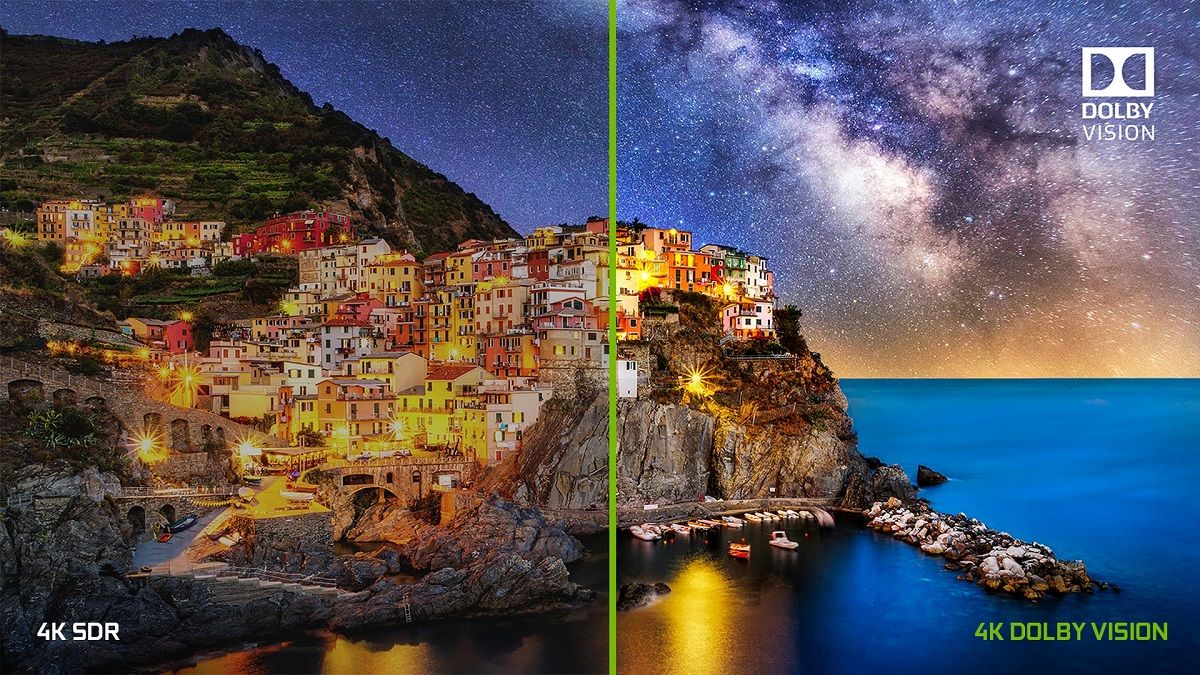
A big part of any TV device is the picture and audio quality. The SHIELD TV supports both Dolby Vision and HDR10. Dolby Vision is arguably better than HDR10 as it includes metadata for dynamic adjustment of HDR based on the scene, but HDR10 is support allows for broader content support. Dolby Vision support is a big deal as it’s a feature that users have repeatedly asked for on older models. During a briefing, NVIDIA was asked if it plans to bring Dolby Vision support to older devices, but the company said that it wouldn’t be able to due to technical limitations.

Sadly, there’s no VP9 Profile 2 support for HDR content in YouTube as NVIDIA says the processor doesn’t support it. The device is capable of supporting HDR10+, but NVIDIA was unable to confirm if either SHIELD will be updated to support it in the future.

Unlike the previous models which only had passthrough support for Dolby Atmos, the new SHIELD now features proper decode support for Dolby 5.1 surround sound. That means you’ll get proper Atmos support in Netflix. Dolby Digital Plus, Dolby TrueHD, DTS-HD, and DTS-X support are also present on both new SHIELD devices.

AI Upscaling

Thanks to the improved Tegra X1+ SoC, NVIDIA is using AI for real-time upscaling of video and gaming content, which the company claims is a first for streaming media players. NVIDIA trained a convolutional neural network (CNN) to predict the difference between high-resolution, original 4K reference videos and linear scaled videos. Then, NVIDIA put the trained model on the processor to have it upscale any content that is 720p or 1080p (up to 30fps) to a higher quality than is possible with traditional upscaling (such as bilinear). For example, HD content can be upscaled to near-4K quality.

You can preview how it looks in real-time with a slider by enabling the AI demo mode, but if you aren’t a fan of how it looks, you can disable it entirely in settings. It works with top video streaming services like YouTube, Netflix, Amazon Prime Video, etc., but it also works with games. You can adjust the Detail level in this AI-Enhanced mode between Low, Medium, or High.

Besides this AI-Enhanced mode, there’s also a standard Enhanced mode that’s new to the SHIELD TV 2019. It’s an improved upscaler compared to the “Basic” mode that’s present on the 2017 model, and it works on all video content, even content running at up to 60fps.

Android 9 Pie with Android TV

NVIDIA is a strong partner of the Android TV ecosystem, so both SHIELD TV products are built with the latest version of Android TV. NVIDIA promises an ad-free, customizable home screen. Both devices feature full Google Cast support, the redesigned Google Play Store shown off at Google I/O, Google Assistant with custom routines, and a range of music services, including the recently-added Amazon Music. Both devices even work with Amazon Alexa voice commands, provided you have Alexa-enabled smart speakers or displays. Finally, when Disney+ launches, it’ll be on SHIELD TV with Dolby Vision and Atmos support.

Since the last SHIELD TV was released in 2017, cloud gaming has significantly matured, so of course, NVIDIA is touting its own GeForce Now game streaming service. At launch, GeForce Now provided a small catalog of games to stream, but it’s since moved to a “bring-your-own-game” model so you can play games like the recently released Fortnite Season 2 on the SHIELD. Although GeForce Now is still free since it’s in beta, there’s a waitlist to gain access to the service. If you’re already in the beta, you’ll be able to immediately play on the new SHIELD TV, but if you haven’t joined yet, you’ll have to wait around 1-2 weeks in most regions to get in. NVIDIA hasn’t settled on any formal pricing for the service, but they’ll share more information when it’s ready for commercial launch. As for Google Stadia, it should eventually come to the device if Google’s Android TV update roadmap pans out, but NVIDIA had little to say on this matter.


SHIELD TV Streaming Stick

NVIDIA SHIELD TV 2019 stick

The SHIELD TV streaming stick, which is officially called just “SHIELD TV,” is the cheaper of the two new devices. The name is familiar, but this is a radically new form factor for the SHIELD TV lineup. Instead of a typical set-top box, the SHIELD TV is a cylindrical dongle that hangs out of sight. It was designed so that it can be pulled away from behind the TV because WiFi can have trouble penetrating TVs. If you have to hang it behind a TV, though, the dongle has a gigabit Ethernet port. Besides the aforementioned Ethernet port, the available ports include an HDMI port with CEC, a microSD card slot, and a power port.

Rounding out the specs, the SHIELD TV stick has 8GB of internal storage, 2GB of RAM, 802.11ac Wi-Fi, and Bluetooth 5.0 LE. NVIDIA says the device has enough storage for “50-70 streaming apps,” leaving nearly 5GB of usable storage for user-installable applications.

For the most part, this is a streaming stick that has all the bells and whistles of a full-blown set-top box. It’s available for $149.99 starting today both online and in retail stores in the United States, Canada, and Europe.

SHIELD TV Pro

NVIDIA SHIELD TV Pro

Next up is the SHIELD TV Pro. NVIDIA is billing this as a device “built for enthusiasts.” They say it was built for the most demanding media and gaming consumers. This is the SHIELD you want if you’re interested in storing a media collection, playing demanding games, or having a smart home hub. The SHIELD TV Pro has all the features mentioned earlier, but it’s in a more traditional set-top box form factor.

On top of all that, though, the Pro model has a few upgrades. RAM is bumped up to 3GB, storage is bumped to 16GB, and there are two full-sized USB 3.0 ports. You can use these to plug in a SmartThings Link to turn the box into a smart home hub. The SHIELD TV Pro also has Plex Media Server built-in and it supports 1080p transcoding. You can easily record gameplay, broadcast gameplay to Twitch, or play a bevy of high-end titles from NVIDIA’s catalog of AAA ported games, including Half-Life 2, Portal 2, Borderlands 2, Resident Evil 5, etc., exclusively for the Pro model.

You can get the SHIELD TV Pro for $199.99 starting today both online and in retail stores in the U.S., Canada, and Europe. There’s no 512GB storage model because NVIDIA points to the ability to adopt external storage as internal storage (a native feature of Android), the added NAS support, and low demand for high local storage.


New Remote, Bring Your Own Controller

If you’ve used a SHIELD TV before, you probably understand why I saved the remote for last. The old remote was arguably the worst thing about the SHIELD TV. It was flat, very small, and didn’t have many buttons. Thankfully, NVIDIA has completely redesigned the remote this time, and it comes in-the-box for both the SHIELD TV and the SHIELD TV Pro.

The new SHIELD remote looks a lot more like a traditional TV remote. It’s thicker and kind of triangular. It also has many more buttons and it takes 2 regular AAA batteries. There is a microphone for voice controls, motion-activation to activate the backlight on the buttons when you pick up the remote, an IR blaster for controlling TVs, Bluetooth, and a lost remote feature. The buttons include power, play, record, pause, forward, reverse, volume, Netflix, voice commands, a circular direction pad, and on the top right, a customizable button with up to 40+ actions.

NVIDIA confirmed to us that they considered the possibility of selling the stick model without the remote for a lower price, but they ultimately decided against it because of the strong desire for folks to have a physical remote. For those of you with an older SHIELD looking to buy this remote separately, it’ll go on sale later this year for $29.99. Again, it comes in-the-box with the SHIELD TV and SHIELD TV Pro, so you won’t have to buy it separately if you buy either of the new devices.

Last but not least is the controller, or rather the lack thereof. There’s no included SHIELD Controller this year. You can buy the existing SHIELD Controller from NVIDIA to use as a game controller, or you can use your existing XBOX One Wireless, DualShock 4, or other Bluetooth controllers. NVIDIA says the new SHIELDs support a range of controllers, but there’s no guarantee every controller will work. There’s no built-in controller remapper, either, so it’s recommended you stick with a more popular controller for guaranteed support.

The post NVIDIA announces the SHIELD TV Pro and SHIELD TV streaming stick appeared first on xda-developers.


from xda-developers https://ift.tt/2Ni7xcj
via IFTTT