LightBlog

vendredi 31 juillet 2020

Learn Linux Inside Out With 110 Hours of Training for Just $69

We often don’t realize it, but Linux plays a huge part in daily life. Every time you search with Google and check Facebook, your device is working with Linux servers. Using an Android phone? That is based on Linux, too. If you would like to know this system better, the Complete 2020 Learn Linux Bundle can help. This huge learning library offers 12 courses and 110 hours of training for only $69 at the XDA Developers Depot.

As you may have gathered by now, Linux is a very powerful and versatile platform. For this reason, expert developers are always in demand, earning up to $111,000 a year according to Payscale. In addition, Linux skills are valuable in many other technical careers.

This bundle provides a comprehensive education in Linux. Through hands-on tutorials, you learn how to power almost any project using the open-source operating system.

You start by learning how to navigate the graphical user interface, before diving into the shell. Once you have some command-line skills under your belt, you discover how to deploy Linux in the cloud, set up enterprise systems, and run Linux servers.

The bundle also provides extensive training on networking and cybersecurity, including full prep for the CompTIA Linux+ exam.

You would normally expect to pay over $3,500 for these courses, but you can get them now for only $69 with this deal.

 
The Complete 2020 Learn Linux Bundle – $69

See Deal

Prices subject to change 

The post Learn Linux Inside Out With 110 Hours of Training for Just $69 appeared first on xda-developers.


from xda-developers https://ift.tt/3jY9WZe
via IFTTT

Motorola One Zoom and Moto G8 Plus get Android 10 soak test updates in Brazil

Different smartphone OEMs go by their own schedule when it comes to Android updates. Motorola, for example, prefers to conduct limited invitation-based public beta testing (commonly referred to as “soak testing”) before the actual release of a major Android version update through the stable channel. The final beta firmware is often mature enough to be considered as the stable build, which means the soak testing phase is a pretty good indicator of the arrival of the stable update. Now, the Motorola One Zoom (also known as the Motorola One Pro) and the Moto G8 Plus have started receiving such soak test builds of Android 10.

Motorola One Zoom XDA Forums || Moto G8 Plus XDA Forums

Motorola One Zoom

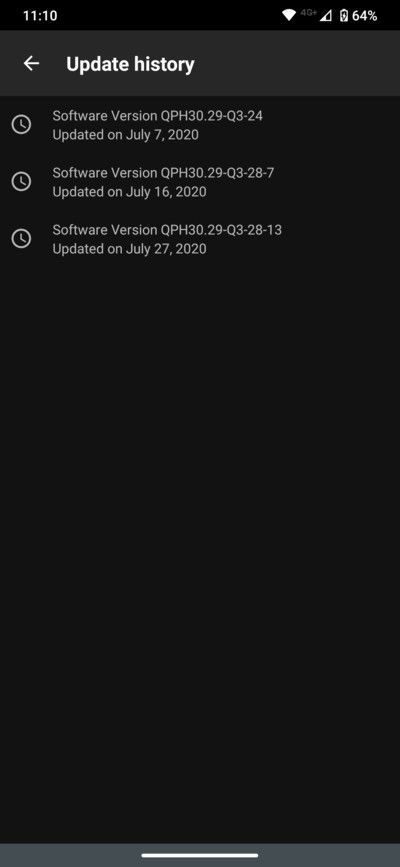
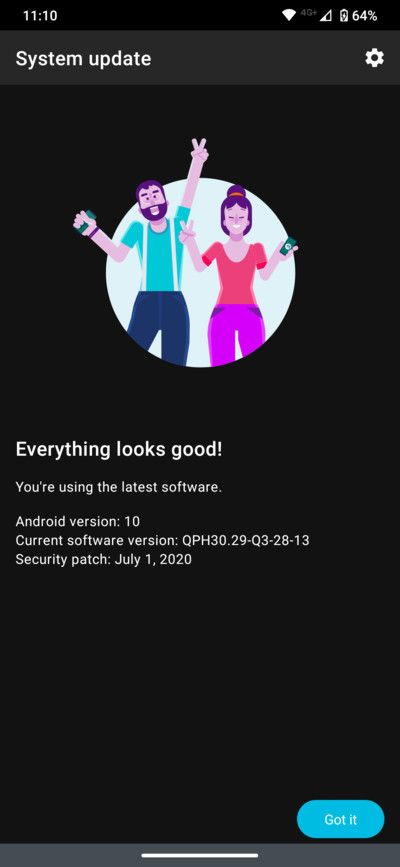
Despite the “One” tag, the Motorola One Zoom (codename “parker”) is not a part of the Android One initiative. The Qualcomm Snapdragon 675-powered phone was announced at IFA 2019 with Android Pie onboard. The Android 10 soak test for this device is currently running in Brazil, where the company has pushed several beta builds so far. The version number of the latest soak test build is QPH30.29-Q3-28-13 and it comes with the July 2020 security patches.

motorola_one_zoom_android_10_soak_test_builds motorola_one_zoom_android_10_soak_test_patch

Moto G8 Plus

The Moto G8 Plus (codename “doha”) packs in the Qualcomm Snapdragon 665 SoC along with 4GB of RAM and 64GB of storage. The phone runs a close-to-stock version of Android Pie out of the box, while the soak testing of Android 10 is underway in Brazil. Those enrolled their device to Motorola’s Feedback Network (MFN) have received multiple beta builds as of yet, with the latest one featuring July 2020 security patches.

moto_g8_plus_android_10_soak_test_build_patch

Thanks to Reddit user u/karanpatils for the screenshot!

It is worth noting that the soak test beta builds sometimes contain critical bugs. Therefore, we would recommend you to stay away from sideloading these beta builds on your daily driver. Once all the known issues are being ironed out, Motorola will push the stable update to all users, including the beta testers.

The post Motorola One Zoom and Moto G8 Plus get Android 10 soak test updates in Brazil appeared first on xda-developers.


from xda-developers https://ift.tt/2D8FnPH
via IFTTT

Samsung rolls out the August 2020 security update to the Galaxy Note 10 series

Just a day ago, Samsung started rolling out an update for the Exynos variants of the Galaxy S10 series in some regions. The update included August 2020 security patches for the Galaxy S10, Galaxy S10+, and Galaxy S10e, along with a new bootloader (v8) for the devices. Even though the update is yet to make its way to most Galaxy S10 users, Samsung has now started rolling out a similar update for the Exynos-powered Galaxy Note 10 devices.

Samsung Galaxy Note 10 XDA Forums || Samsung Galaxy Note 10+ XDA Forums

The latest update for the Samsung Galaxy Note 10 series (software version N975FXXS6CTGA/N975FOXM6CTGA) measures in at 168.86MB and it includes the August 2020 security patches. Much like the OTA update for the Galaxy S10 series, the update also brings a new bootloader (v6) for the Galaxy Note 10 series, which means that end-users will no longer be able to downgrade to older builds once they install this update.

Samsung Galaxy Note 10 series August 2020 security patches

Thanks to XDA Senior Member jaylence for the screenshot

As with all previous updates from Samsung, the latest OTA update is currently rolling out to a few users and it’s expected to reach all Galaxy Note 10 series devices in the coming days. In case you don’t wish to wait for the OTA update, you can use a community developed tool called Frija to download the updated firmware for your device from Samsung’s repository. The required parameters can be found in the screenshot below.

Samsung Galaxy Note 10+ Frija firmware

Thanks to XDA Senior Member henklbr for the screenshot

Once you have downloaded the decrypted firmware package created by Frija, you can flash it on your device using Odin. You can follow the instructions given in this post if you aren’t familiar with upgrading your Samsung device’s firmware with Odin. Do note that the aforementioned update is only for the international Exynos 9825-powered Galaxy Note 10 devices and it isn’t compatible with the Snapdragon 855-powered variants of the Galaxy Note 10 series.

The post Samsung rolls out the August 2020 security update to the Galaxy Note 10 series appeared first on xda-developers.


from xda-developers https://ift.tt/3hQnnsf
via IFTTT

Honor 9A, Honor 9S launched in India with AppGallery, alongside Honor MagicBook 15

Honor is launching two smartphones in the Indian market, focusing on the entry-level segments in one of the most competitive markets in the world. The Honor 9A was released earlier this year in China, and the device made its way to the European markets later. Similarly, the Honor 9S and MagicBook 15 have also made their way to global markets, and are now finally making their way to India.

Honor 9A and Honor 9S

Specification Honor 9A Honor 9S
Dimensions & Weight
  • 146.5 x 70.94 x 8.35 mm
  • 144g
Display
  • 6.3″ HD+ display
  • 5.45″ HD+ display
SoC
  • MediaTek Helio P22 MT6762R
  • MediaTek Helio P22 MT6762R
RAM & Storage
  • 3GB + 64GB
  • Expandable via microSD
  • 2GB + 32GB
  • Expandable via microSD
Battery & Charging
  • 5000mAh battery
  • Reverse wired charging
  • 3020mAh battery
Rear Camera
  • 13MP
  • 5MP
  • 2MP
  • 8MP, f/2.0
Front Camera
  • 8MP
  • 5MP, f/2.2
Other Features
  • Rear fingerprint sensor
  • MicroUSB port
  • 3.5mm headphone jack
  • MicroUSB port
  • 3.5mm headphone jack
Android Version Android 10 with Magic UI 3.1 Android 10 with Magic UI 3.1

The Honor 9A and Honor 9A are decidedly entry-level devices, so people used to flagships may not find them impressive by themselves. However, Honor’s use of the aging MediaTek Helio P22 on both the phones does not incite confidence as the phones will face very stiff competition from phones from Xiaomi, Realme, and Samsung. Further, both of these devices do not come with GMS and Google Play Store, and instead, adopt Huawei’s AppGallery and HMS Core.

HONOR 9A

Honor 9A

The Honor 9A will be available in Midnight Black and Phantom Blue color variants, starting from August 6, 2020, on Amazon.in. The phone will cost ₹9,999, but users can get it for ₹8,999 in the first sale.

HONOR 9S

Honor 9S

On the other hand, the Honor 9S comes in Blue and Black color options for ₹6,499, but users can get it for ₹5,999 in the first sale.

Honor MagicBook 15

The Honor MagicBook 15 is Honor’s first foray into the laptop market in India. As the name implies, it features a 15.6″ FHD IPS display with an 87% screen-to-body ratio and TÜV Rheinland certification. The laptop is powered by the AMD Ryzen 5 3500U processor coupled with Radeon Vega 8 graphics. You also get 8GB of DDR4 dual-channel RAM and a 256GB PCIe NVMe SSD.

HONOR MagicBook 15

The laptop is charged through an included 65W charger that charges the laptop 0-50% in half-hour through the USB Type-C port. Other notable features on the notebook include a two-in-one fingerprint power button, a pop-up webcam hidden underneath the camera button, Wi-Fi, Bluetooth, NFC, and more. And of course, you also get Windows 10 Home edition preloaded.

The Honor MagicBook 15 is priced at ₹42,990 in India and will go on sale on August 6, 2020, in the Mystic Silver color option on Flipkart.com. There is a first-sale discount available, letting users pick it up for ₹39,990.

Buy the Honor MagicBook 15 from Flipkart

The post Honor 9A, Honor 9S launched in India with AppGallery, alongside Honor MagicBook 15 appeared first on xda-developers.


from xda-developers https://ift.tt/33jEdvk
via IFTTT

Xiaomi Black Shark 3S with 120Hz refresh rate display, Snapdragon 865 launched in China

Over the last couple of days, several smartphone OEMs have launched their latest and greatest gaming smartphones. ASUS unveiled its ROG Phone 3 and ROG Phone 3 Strix Edition, Lenovo launched the much-awaited Lenovo Legion Phone Duel, and Nubia launched the Red Magic 5S. Adding on to the list of new gaming smartphones, Xiaomi has now unveiled the Black Shark 3S in China. Xiaomi’s latest gaming smartphone is just a minor upgrade over the Black Shark 3 from earlier this year, with a better screen and a few other changes.

Xiaomi Black Shark 3S: Specifications

Specification Xiaomi Black Shark 3S
Display
  • 6.67-inch FHD+ AMOLED
  • 120Hz refresh rate
  • 270Hz touch sampling
  • 17ms latency
SoC Qualcomm Snapdragon 865
RAM & Storage
  • 12GB LPDDR5 + 128GB UFS 3.1
  • 12GB + 256GB
  • 12GB + 512GB
Battery & Charging
  • 4,720mAh
  • 65W fast charging via USB Type-C
  • 18W fast charging via secondary magnetic port
Rear Camera
  • 64MP primary camera
  • 13MP wide-angle camera
  • 5MP depth sensor
Front Camera 20MP
Other Features
  • 3.5mm headphone jack
  • Secondary magnetic charging port
  • USB Type-C
Android Version Joy UI 12 based on Android 10

For the most part, the Black Shark 3S is the same device as its predecessor. It’s powered by the same Qualcomm Snapdragon 865 chip, packs in 12GB of LPDDR5 RAM, and up to 512GB of UFS 3.1 storage. It offers the same camera setup, with a 64MP primary camera, a 13MP wide-angle camera, and a 5MP depth sensor on the back, along with a 20MP selfie camera over on the front.

Black Shark 3S SoC RAM Storage

The device packs in the same 4,720mAh battery with support for 65W fast wired charging via USB Type-C, it still features a 3.5mm headphone jack, and it also includes a secondary magnetic charging port, which is capable of charging the device at 18W.

Xiaomi Black Shark 3S 120Hz panel

In terms of improvements, the Black Shark 3S packs in a 6.67-inch FHD+ 120Hz high refresh rate display, instead of the 90Hz display found on the previous model, and it runs the company’s latest Android skin — Joy UI 12.

JoyUI 12 Voice Controls JoyUI 12 - Somatosensory controls

Thanks to the new software, Xiaomi has managed to include several new features on the Black Shark 3S, including screen pressure 4.0 for 3D touch controls, voice control 2.0 to help users adjust settings using voice commands while in-game, and something called somatosensory control that offers 6 built-in somatosensory actions. We aren’t exactly sure what somatosensory control offers, but it seems to refer to touch-sensitive shoulder buttons on the device.

JoyUI 12 Game Barrage

Additionally, Joy UI 12 brings features like Game barrage to control notifications while playing games, Game macro to help users set up macro commands in games, Hunting mode to enhance vegetation and ground contrast in games, and Black Shark Moment 3.0 for game recording and editing.

Joy UI 12 screencasting

Joy UI 12 also enables screencasting support on the Black Shark 3S, which will let users cast their device’s screen on a larger display with a delay of just 40ms.

Xiaomi Black Shark 3S shoulder buttons Xiaomi Black Shark 3S finger gloves

Along with the Black Shark 3S, Xiaomi has also announced a couple of new gaming accessories. These include the Black Shark Gamepad 3, Black Shark Gaming Finger Gloves, and an attachment that adds physical shoulder keys to the device.

Pricing and Availability

The Black Shark 3S will be available in three RAM/storage variants that have been priced as follows:

  • 12GB+128GB: CNY 3999 (~$573)
  • 12GB+256GB: CNY 4299 (~$616)
  • 12GB+512GB: CNY 4799 (~$688)

The device will go on sale in China starting from August 4th via JD.com and other major Chinese etailers. Buyers will be able to choose from two different color options — Skyfall black and Crystal blue.

Xiaomi Black Shark 3S color variants

The new Black Shark Gamepad 3 has been priced a CNY 238 (~$34), while the Black Shark Gaming Finger Gloves and shoulder keys will be available for CNY 29 (~$4) and CNY 79 (~$11), respectively. As of now, we have no information from Xiaomi regarding a global launch.

The post Xiaomi Black Shark 3S with 120Hz refresh rate display, Snapdragon 865 launched in China appeared first on xda-developers.


from xda-developers https://ift.tt/39N0naD
via IFTTT

Download: OnePlus 6 and 6T receive OxygenOS 10.3.5 with RAM optimizations, OnePlus Buds support, and more

OnePlus recently rolled out new OxygenOS updates to the OnePlus Nord and the OnePlus 8 family that brought in necessary support for their first pair of truly wireless earbuds — the OnePlus Buds. In a similar fashion, the OnePlus 6 and the OnePlus 6T have now picked up a new stable build of OxygenOS that not only enables official support for the OnePlus Buds on the device duo, but also brings over the July 2020 security patches.

OnePlus 6 XDA Forums || OnePlus 6T XDA Forums

According to a recent post on the OnePlus Community forums, the OEM has started the incremental rollout of OxygenOS 10.3.5 for the OnePlus 6 and OnePlus 6T. Besides the bump in the Android security patch level (SPL), the update also addresses an issue related to frequent crashing of Google Chrome on these phones. Moreover, the new build of OxygenOS includes a fix for the black screen bug while opening the OnePlus Logkit app. For those not familiar with OnePlus Logkit, it is a handy built-in diagnostic app to collect device logs which can be executed by dialing *#800# in stock dialer.

You can find the complete changelog for this update below:

OxygenOS 10.3.5 Changelog for the OnePlus 6 & 6T

  • System
    • Optimized RAM management
    • Newly adapted OnePlus Buds, easier to take advantage of wireless connection
    • Fixed the crash issue when browsing on Chrome
    • Fixed the black screen issue when opening logkit
    • Improved system stability and fixed general bugs
    • Updated Android Security Patch to 2020.07
    • Updated GMS package to 2020.05
oneplus_6_6t_oxygenos_10.3.5_ota

Thanks to OnePlus Community user MMuralidhar for the screenshot!


Download OxygenOS 10.3.5 for the OnePlus 6 & 6T

The company is following a staggered rollout model, which means they are rolling out the update to a handful of users first. If no critical issue pops up during the initial phase, the rollout will gradually be expanding to more devices over the coming days. However, you can grab the appropriate update package for your model from the index below and freely sideload it right away.

OxygenOS 10.3.5 for the OnePlus 6

OxygenOS 10.3.5 for the OnePlus 6T


Thanks to XDA Senior Member Some_Random_Username for the download links!

The post Download: OnePlus 6 and 6T receive OxygenOS 10.3.5 with RAM optimizations, OnePlus Buds support, and more appeared first on xda-developers.


from xda-developers https://ift.tt/3ggj8FZ
via IFTTT

Android’s Nearby Share now works on Windows via Google Chrome

Google’s alternative to Apple’s AirDrop sharing feature, called Nearby Share, started rolling out to some users in a Google Play Services beta late last month. Shortly thereafter, Google started rolling out Nearby Share support to Chrome OS, allowing Chromebook users to start sharing files with nearby devices by enabling a couple of experimental flags. Now, according to a recent report from Techdows, Nearby Share is rolling out to Google Chrome on Windows on the Chrome Dev and Canary channels.

In order to use the new Nearby Sharing feature, you’ll first need to head over to chrome://flags and enable the “Nearby Sharing” flag. Once you’ve enabled the flag, you’ll need to restart the browser and then head to chrome://nearby. The following page will bring up a list of supported devices that you can share files with.

Chrome Windows Nearby Share

However, there are a couple of requirements that you need to fulfill for the feature to work as intended. First, you will need a Windows PC with Bluetooth support and a supported Pixel smartphone or Chromebook. Secondly, both devices need to be unlocked and close to each other with Bluetooth enabled. And finally, if you’re using a Chromebook to test out the feature, the Chromebook should have Nearby Sharing feature enabled in the Quick Settings.

Google Chrome Windows Nearby Share

While I do have a PC that supports Bluetooth, I wasn’t able to see the feature in action because I don’t have access to a supported Google Pixel smartphone or Chromebook. In case you do have devices that meet all the requirements mentioned above, do try out Nearby Share and share your experience in the comments section below. It’s also worth noting that while Google Chrome on the stable channel (v84.0.4147.105) does show the Nearby Sharing flag on my system, it doesn’t open up the chrome://nearby page yet.


Via: Techdows

The post Android’s Nearby Share now works on Windows via Google Chrome appeared first on xda-developers.


from xda-developers https://ift.tt/3154gnp
via IFTTT