Windows 11 first showed its face on June 24th, 2021, and it’s been officially available since October 5th that same year. Today, most laptops being sold come with Windows 11 installed out of the box, and it’s becoming increasingly popular. But the Windows development cycle never stops, and there’s always something to look forward to. That’s where the Windows Insider Program comes into play, as it lets fans try out new Windows 11 features in preview before anyone else.
At any given moment, there’s something Windows Insiders can try that most other users don’t yet have, but sometimes, it’s hard to keep track of what those things are. If you’re curious about the future of Windows, we’ve rounded up all the Windows 11 features that are currently available in preview, so you can get a glance of what’s coming, or maybe even decide if now is a good time to become a Windows Insider yourself. Though, if you’re considering that, definitely check out our guide to the Windows Insider Program channels first. With that out of the way, let’s get into what you can try right now.
Windows 11 2022 Update (version 22H2)
Although it’s no longer exclusive to Windows Insiders, Microsoft recently released the Windows 11 2022 Update, bringing a ton of new features to the table. The update is rolling out gradually to the general public, but the Windows Insider program is an easy way to get it before everyone else by joining the Release Preview channel. The new features include more touch gestures, Start menu folders, and the return of drag-and-drop support for apps on the taskbar. We recommend checking out everything that’s new in the Windows 11 2022 Update if you haven’t already.
However, some additional features are still being tested by Insiders before they’re officially released. Currently, the Release Preview channel is testing a File Explorer with tabs, which will be available to the general public in late October.

Desktop environment
Tablet-optimized taskbar
One of the biggest changes for touchscreen users is the new tablet-optimized taskbar. This was in testing prior to the launch of Windows 11 version 22H2, but it was removed before the official launch. Now, Microsoft has re-added this feature, only for Windows Insiders in the Dev channel. Essentially, this allows the taskbar to collapse into a smaller view when you’re using a touch-enabled device without a keyboard or mouse attached. This will make it so that the taskbar only displays information like the battery, time, and internet connection, and if you want to access the apps on your taskbar, you have to swipe up from the bottom to see them.

Along with this, all devices (not just tablets and 2-in-1s) will see an updated design for the system tray, featuring a tweaked look when you hover over the icons in the system tray area.
These changes are available in both the Dev channel and the Beta channel. You’ll need to be running build 22623.730 or higher in the Beta channel to have it.
Suggested actions
Suggested actions is a feature designed to make it easier to take actions on specific kinds of text when you select it. For example, if you select a phone number and copy it, Windows 11 will show you the option to call that number on Microsoft Teams. If you copy a date, you might see the ability to create an event in Outlook.

This feature is available in the Dev channel and in the Beta channel if you have updated to Windows 11 build 22622.290 or higher. You’ll also need to have your region set to the US, Canada, or Mexico for it to work.
Improved sharing
Microsoft is also testing a way to make it easier to share files with PCs on the same network. The Windows share panel now supports device discovery of UDP, so the “Nearby sharing” category can now show other PCs on the same network so you can easily send files over.

Microsoft also briefly tested the ability to easily share local files by uploading them to OneDrive, but this capability has been temporarily removed from Windows Insider builds.
This new sharing experience is available in both the Dev channel and the Beta channel if you’ve opted to receive build 22622.
Taskbar overflow
A major change that’s being tested with Windows Insiders right now is the return of the taskbar overflow menu, meaning you can actually see all your open and pinned apps more easily. When the apps on your taskbar exceed the available space on the screen, you’ll see a taskbar overflow button to display the rest of the apps you have open. Just as with the taskbar itself, you can see your pinned apps here and most of the features you’d see for the taskbar also work here.

This feature is available in the Dev channel and in the Beta channel for users running build 22622 or higher.
Other taskbar improvements
Microsoft briefly experiemnted with placing a search bar on the desktop as a replacement for the old Search button, but now, the company is trying something else. You may see a variant of the Search button on the taskbar. One option redesigns the Search icon with a logo representing the web, while the other two options show a search bar saying “Search” or “Search the web”, which could make it easier for new users to know what the icon does right away.

This new feature is being tested only in the Dev channel for now.
Microsoft is also making the Task Manager more easily accessible again through the Windows 11 taskbar. Starting with Windows 11 build 25211, you can find Task Manager when you right-click anywhere on the taskbar, just as you could before Windows 11.

Redesigned Open with menu
Although it was previously in testing already, Microsoft has once again brought a new “Open with” menu to Windows Insiders. While it’s functionally not very different from what we currently have, this new menu has some big design changes. Now, it has rounded corners and a translucent effect instead of a solid color. Plus, this version of the menu follows the system theme, instead of always having a white background.

This new menu also changes how you choose a permanent default app for a given file type. Now, after you choose an app to open a specific file type, you choose to that file type with that app “Always” or “Just once”.
This new design is available in the Dev channel and in the Beta channel for users running Windows 11 build 22622.
Released with Windows 11 build 25201 in the Dev channel, Microsoft has made it possible to open an expanded view of your widgets panel, which takes up the entire screen. This allows you to see more of your widgets at once or more news in the news feed. You can click an icon in the top-right corner of the widgets panel to switch to the expanded view or switch back to the regular view.

With build 25211, Microsoft has also updated the way the buttons in the top-right corner of the widgets panel work. Now, you can click your profile picture to view settings related to taskbar behavior for the widgets button.

To add a new widget, you can still click the + (plus) button.
A new addition to the Widgets panel is the new Xbox Game Pass widget. This lets you quickly see information about games on Xbox Game Pass, including recently-added titles, games leaving the program soon, and other highlighted games in specific categories. You can also sign into your Microsoft account in the Game Pass widget, so you get more personalized recommendations and the ability to jump back into recently played titles.

The Xbox Game Pass widget is only available in the Dev channel for now.
Starting with Windows 11 build 25217 in the Dev channel, Microsoft has begun enabling support for app developers to create third-party widgets. End users probably won’t see this for now, but this could make the Widgets panel far more useful in the future.
Settings app
Better Microsoft account management in Settings
A minor update that’s also been made to the Settings page is the ability to see information about your standalone OneDrive subscription in the Settings app. In Windows 11 version 22H2, this only works with Microsoft 365, which also includes OneDrive storage – but if you happen to have a standalone 100GB OneDrive subscription, you can see it now. There’s also a banner at the top of your account page that warns you if you’re close to your storage limit.

This feature is available in the Dev channel and in the Beta channel if you have build 22622.290 or higher.
Additionally, you’ll now be able to see information about perpetual licenses of Office 2019 or 2021 that are linked to your account. And, if you have a Microsoft 365 subscription, you can now see an option to install your Office apps directly in the Accounts page without having to navigate to the Microsoft account page manually. These changes are only available in the Dev channel.
For Windows Insiders in the Dev channel, there’s yet another capability added to this page with Windows 11 build 25193. Now, you can also manage your Xbox-related subscriptions, including Xbox Game Pass for Console, PC Game Pass, Xbox Game Pass Ultimate, and Xbox Live Gold.

App usage history
Another improvement in the Settings app is a new page in Privacy & security section of the Settings app. If you go into the App permissions page, you’ll be able to see what apps used permission to access resources on your computer over the past seven days. That means you can see which apps used your location, camera, microphone, contacts, pictures, and so on.
Windows Spotlight theme
In the Personalization section of the Settings app, you can now find a new theme option out of the box, that being the Windows Spotlight theme. Windows Spotlight is a feature that shows you new background images every day, and in fact, you can already use it even if you’re not an Insider, but you’d have to specifically go into the Background settings, and now, you can find the Windows Spotlight theme directly under Personalization, so it also includes a theme color associated with the theme

The theme is represented by a preview showing multiple background images and a small icon indicating that the images rotate. This is currently only available in the Dev channel.
Improved app management
The Settings app keeps getting new capabilities to help it replace the classic Control Panel, and now, you can uninstall apps that have multiple inter-dependencies, such as Steam and games installed through Steam. It’s a small change that should help users have more consistent experiences. It’s still exclusive to the Dev channel, however.
New setting for touch keyboard
Another smaller change Microsoft has made in the Settings app has to do with the touch keyboard settings. Now, you have the option to choose whether you want the touch keyboard to never appear automatically, to appear only when there’s no physical keyboard detected, or to always appear when you tap a text input box. Before, only the first two options were available.
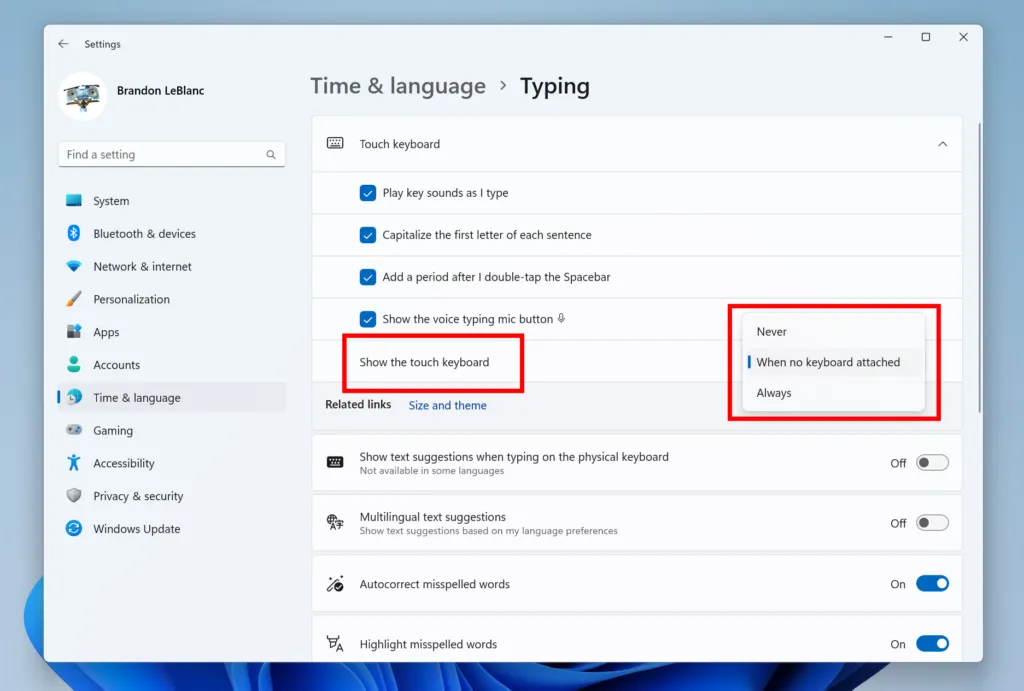
This new setting is only available in the Dev channel at this time.
New animations
Microsoft has added a new visual flourish to the Settings app by making the icons on the side menu animated. When you switch to a different category in the side menu, you’ll see a brief animation play for the section you’re switching to, making the interface feel a bit more alive.
Currently, these animated icons are only available to Windows Insiders in the Dev channel, starting with build 25197.
Dynamic refresh rate support for external monitors
Dynamic refresh rate is one of the features that debuted with Windows 11, specifically with the Surface Laptop Studio and Surface Pro 8. However, it’s only ever been available to built-in displays on select devices. Now, if you have an external monitor with a refresh rate of 120Hz or higher, you can also use a dynamic refresh rate for it. This change is currently only available in the Dev channel starting with build 25206.
Accessibility
Braille improvements
Microsoft has also improved support for Braille devices to make the experience better for blind or low-vision users. This makes it so that your Braille device can continue to work properly when switching between the Narrator and third-party screen readers, so your experience isn’t interrupted.
Additionally, in another update, Microsoft has added support for more Braille displays, in addition to adding new Braille input and output languages. You’ll need to uninstall the previous Braille support in the Settings app, then reinstall it for this to work.
These improvements are currently only available in the Dev channel.
Built-in apps
Some Windows 11 apps also often get updates exclusively for Windows Insiders. These tend to roll out to everyone over time without requiring a full OS update, but some changes may require such an update.
Local Administrator Password Solution built-in
For business users relying on the Local Administrator Password Solution (LAPS) software, you’ll be happy to know that Microsoft has built it into Windows 11. It also includes some new capabilities. Once setting the feature up, you’ll be able to see LAPS in your Group Policy Editor and edit it as necessary.

This feature is only available in the Dev channel.
Windows Terminal becomes the default
It’s been possible to set Windows Terminal as your default terminal app in Windows 11 for a while now, but now, that actually has become the default setting, meaning your Command Prompt and PowerShell windows will open in Windows Terminal by default. You can change this in the Settings app, however. This is available in both the Dev and Beta channels.
A new Photos app
Microsoft also recently began rolling out a completely redesigned Photos app for Windows Insiders in the Dev channel. This new app comes with an updated gallery view and improved navigation thanks to the new sidebar. You can now easily access your OneDrive memories and view who much storage you still have on OneDrive directly in the main screen of the app.

This version of the app does remove the video editor feature, because Microsoft now includes Clipchamp with Windows 11, which is a much more capable video editor. This new Photos app is expected to be available to everyone in late October to early November. Additionally, Microsoft recently revealed that this new Photos app will also feature integration with iCloud Photos, so you can see all your pictures in one place if you have an Apple device.
Another change recently added in the Windows Insider program is in the Snipping Tool app. With version 11.2209.2.0, the Snipping Tool automatically saves any screenshots you take to the Screenshots folder. You can change this behavior in the app’s settings.
Microsoft also recently announced that the Snipping Tool will soon be able to record videos, though this feature isn’t available to try just yet.
Miscellaneous improvements
Improved Euphemia typeface
If you speak a language that uses the Euphemia typeface – mostly covering languages that use the Canadian Syllabic script – you’ll notice an improved Euphemia typeface. Over 200 characters ahve been updated to be more easily readable, plus new glyphs have been added to line up with the latest Unicode 14 standard. There are new characters for the Nattilik language of the Canadian arctic region in this update. This is currently only available to Windows Insiders in the Dev channel.
Kiosk mode
Another big change coming to Windows 11, especially for IT administrators and public spaces, is the multi-app kiosk mode. This feature isn’t new to Windows itself, but it’s making its debut in Windows 11 now. A kiosk mode allows administrators to select a few specific apps that can be accessed by users, which can be useful for demo units or public computers where it’s important to prevent tampering with the experience. This feature is only available in the Dev channel.
SMB authentication rate limiter
With Windows 11 build 25206, Microsoft also enabled the SMB authentication rate limiter by default. This is a security feature that causes a delay whenever a user tries to log into an SMB server and enters the wrong credentials. Now, every failed attempt causes a 2-second delay until another authentication attempt can be made again, which significantly slows down brute force attacks to hack into an SMB server. As an example, an attacker could previously have tried to submit 300 authentication attempts per second for five minutes, resulting in 90,000 submitted passwords in total. With this delay, entering 90,000 passwords would take over 50 hours.
And those are all the Windows 11 features that are currently in preview for Windows Insiders. With Windows 11 version 22H2 expected in the next few weeks and months, that’s definitely the most exciting thing you can test right now, but there are a few other features here and there that are interesting. We’ll keep this list updated as new features are released, so keep checking back.
The post Windows 11 features already in preview: Everything you can try right now appeared first on XDA.
from XDA https://ift.tt/m8kTbWD
via
IFTTT

